In this assignment you’ll be continuing your work on the Asteroids game. This assignment assumes you have already completed the Tutorial part of this assignment and will ask you to continue working on that same file. The final submission must include ALL parts of the assignment.
Getting Started
Open your tutorial_10.rkt file you worked on for the tutorial. You’ll use this as a starting point. It might also be useful to refer to that page for details on how the Asteroids Library works and how to deal with posns. I’d recommend first making a copy of the file and naming the new one exercise_9.rkt so you know which file is the new one.
For this exercise, we’re going to add two new kinds of objects to the Asteroids game to make it more interesting. The first kind of object is a guided missile, homing-missile, that automatically targets the closest asteroids and the second kind of object is an immortal enemy the ufo, that slowly moves toward the player to attack it.
Here is an example screenshot of the completed game. Your work doesn’t have to look 100% the same.
Screenshot of Finalized Asteroids
Open Screenshot in a New Window
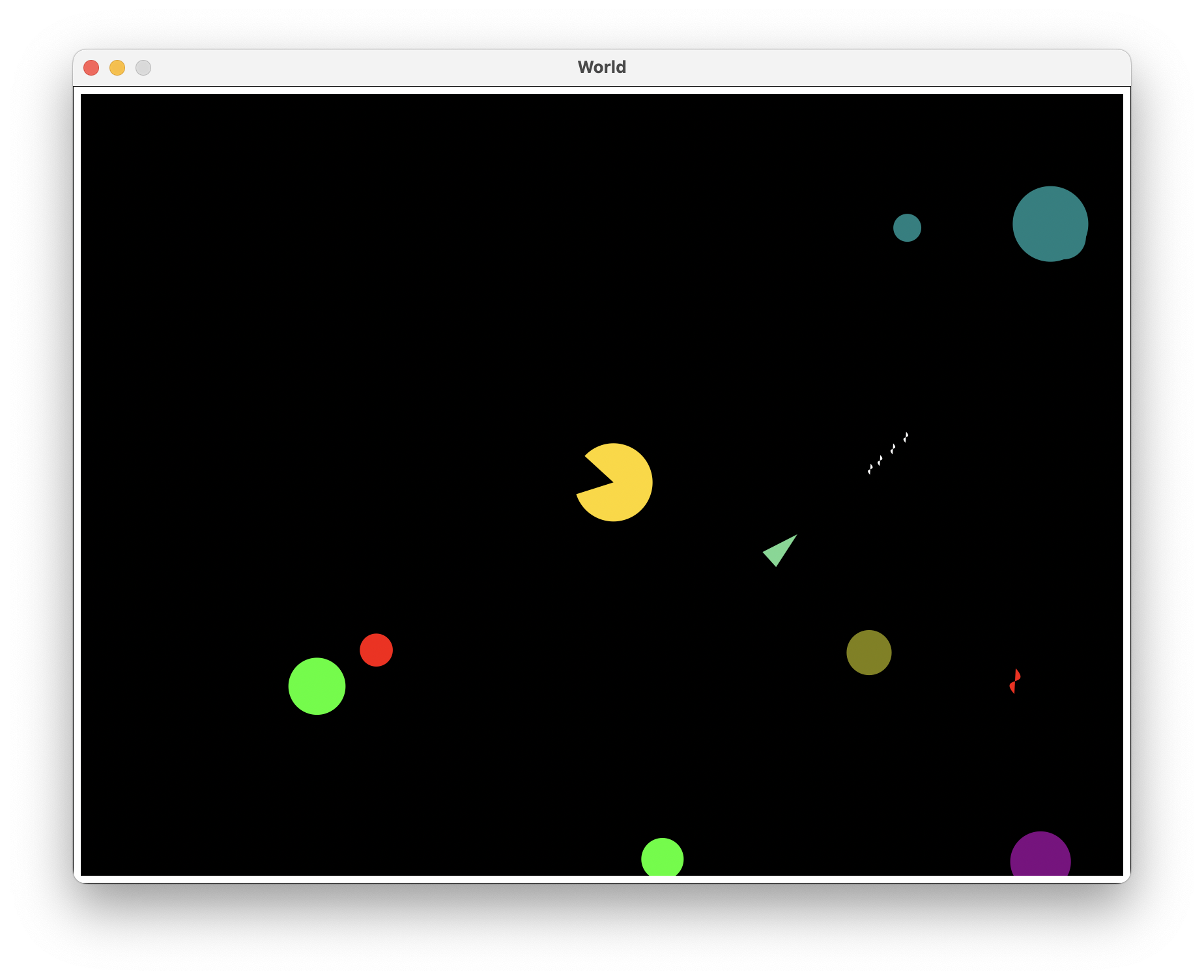
- The asteroids are the various colored circles.
- The player is the green-ish triangle
- The heat seeker missile is the red object and is accelerating towards the closest asteroid to itself.
- The regular missiles are the white objects and are accelerating straight forwards and are destroyed whe their lifetime runs out.
- The UFO is the pac-man like object which is traveling at a constant speed toward the player.
Part 1. The homing-missile Struct
Use define-struct to define a new structure type homing-missile that is a sub-type of the missile struct:
- Name of the new structure type:
homing-missile - Sub-type of:
missile - Properties: The
homing-missilestruct does not add any extra properties to the missile struct.
At this point, you should be able to run the game and press s to fire homing-missiles. Next, implement the update!, render and radius methods of the homing-missile struct to make it track asteroids.
- The
update!method should mutate the velocity of thehoming-missileso it is accelerating in the direction of the closest asteroid. When no asteroid is left on the screen, the homing-missile’s velocity stays constant.- Unless there are less than or equal to 2
homing-missiles in the game, call thedestroy!method on this missile.
- Unless there are less than or equal to 2
More concretely, if the new velocity of the homing-missile is v2, the old velocity of the homing-missile is v1, the position of the asteroid closest to the homing-missile is PA and the position of the homing-missile is PM, then v2 - v1 should be parallel to PA - PM. Again, the asteroids_lib.rkt library provides two functions for computing with game objects’ positions.
; heading-of : game-object game-object -> posn
; Computes the direction (unit vector) pointing towards the first object when viewing from the second object.
The heading-of function takes to game objects, A and M, and computes the unit vector that points toward A when viewing from M.
; closest-asteroid-to : game-object -> asteroid or #false
; Takes a game object and returns the nearest asteroid to the given game object or #false if there is no asteroid left.
The closest-asteroid-to function takes a game-object and returns the asteroid that is closest to the given game-object if there is at least one asteroid on the screen (i.e. in the all-game-objects list). When there are no asteroids left, closest-asteroid-to returns #false so make sure to take that into account.
- The
rendermethod returns an image of thehoming-missile. - The
radiusmethod returns the size of thehoming-missile. It should be a positive number.
We didn’t mention anything about decreasing the homing-missiles’ lifetime. It’s up to your choice to grant the homing-missiles eternal lives or not.
Part 2. An Enemy AI: The ufo struct
Use define-struct to define a new structure type ufo that inherits the game-object struct:
- Name of the new structure type:
ufo - It’s a sub-type of
game-object - Fields: The
ufostruct does not add any extra fields to thegame-objectstruct.
Having defined the ufo structure type, the asteroids_lib.rkt library should automatically create a ufo when you start the game (by default the engine rotates the UFO about its centroid). As usual, continue to implement the ufo-specific behavior via the methods.
Implement the update!, radius, render and the destroy! methods so the ufo is both immortal and stubbornly moving towards the player.
Hint. You can access the information of the player through the Game States. To see who calls the destroy! method and when
destroy!is called, see thegame-objectStruct.
- The
rendermethod returns an image of the ufo. - The
radiusmethod returns the size of the ufo. It should be a positive number. - The
update!method should directly set the velocity of the ufo struct to a vector (it cannot have magnitude 1) that points toward the player (i.e. no acceleration, only a change of direction). - The
destroy!method should move the ufo struct back to(100, 100)on the screen, instead of removing itself fromall-game-objects(as the default implementation of game-object does).
Double Checking Your Work
MAKE SURE THAT THERE ARE NO CALLS TO THE asteroids (e.g. (asteroids)) function IN YOUR CODE WINDOW. You should only do that in the REPL.
You only need to submit the exercise_9.rkt file.
Before turning your assignment in, run the file one last time to check your automated tests and then run (asteroids) in the REPL to test your game to make sure that it runs properly, doesn’t generate any exceptions, and all the tests (both built-in and custom) pass. Make sure you’ve spent some time writing your OWN check-expect calls to test your code.